Conversations
Front DeskConversations is the text side of your Front Desk. Customers text your business number, the AI replies in your voice using the same knowledge it uses on calls, and the whole thread lives here as a shared inbox your team can read and join. It can complete real jobs in the thread, including answering questions, booking appointments, and sending links such as your menu or booking page. It never asks for card details by text; anything that needs paying goes out as a secure link instead. You can take over a conversation at any point and type yourself, which is the right move for anything delicate. One thing to plan for: United States carriers require every business number to be registered before it can send texts, so messaging becomes available after that registration clears rather than instantly.
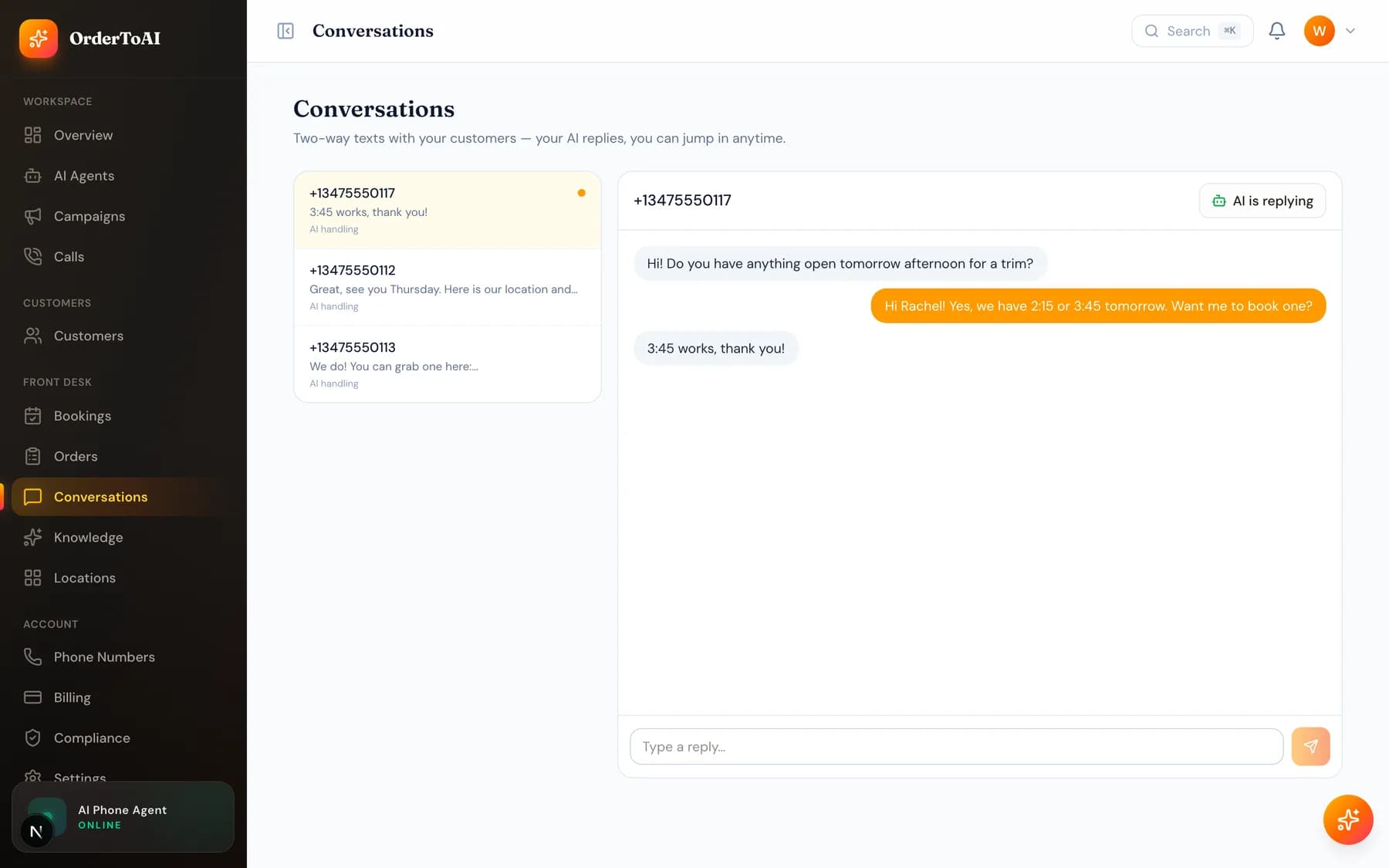
What the AI will and will not do by text
It answers questions from your knowledge, offers appointment times and books them, and sends the links you have approved. It follows the same rules as on a call: it does not invent details it was never told, it says it is an AI when asked, and it never takes payment details in a message.
When a conversation needs a person, you can simply start typing. The AI steps back once you are in the thread, so there is no risk of you and the assistant both replying to the same customer.
Questions
- Why can my AI answer calls but not texts yet?
- Because United States carriers require business numbers to be registered before they can send text messages, and that approval sits with the carriers rather than with us. It is submitted automatically when you get your number. Voice is unaffected and works straight away.
- Can I take over a text conversation from the AI?
- Yes. Open the thread and type. The AI steps back once you are involved, so your customer never gets two replies to the same question. This is the right approach for complaints or anything sensitive.
- Will the AI take payment by text?
- Never. It does not ask for card details in any channel. When something needs paying it sends a secure link to your own payment page, which keeps card data out of your text history and out of your compliance scope.
- What happens if someone texts STOP?
- They are opted out immediately and added to your internal Do-Not-Call list, which applies across both texts and calls from that point on. Honouring opt-outs across channels is enforced by the platform rather than left to you.
Next steps
Knowledge
What your AI knows, where that knowledge comes from, and how to add hours, services, prices, and answers so it stops saying it does not know.
Phone numbers
Choosing a local number, transferring the number you already advertise, attaching numbers to locations, and how forwarding fits with the number you keep.
Compliance
The controls that keep outbound calling lawful: your internal Do-Not-Call list, customer local calling hours, and the evidence trail behind every call.
Hear it on your own business
Reading about it only goes so far. The demo calls you and answers as your business, using your real Google profile, before you create an account.
Start free trial