Orders
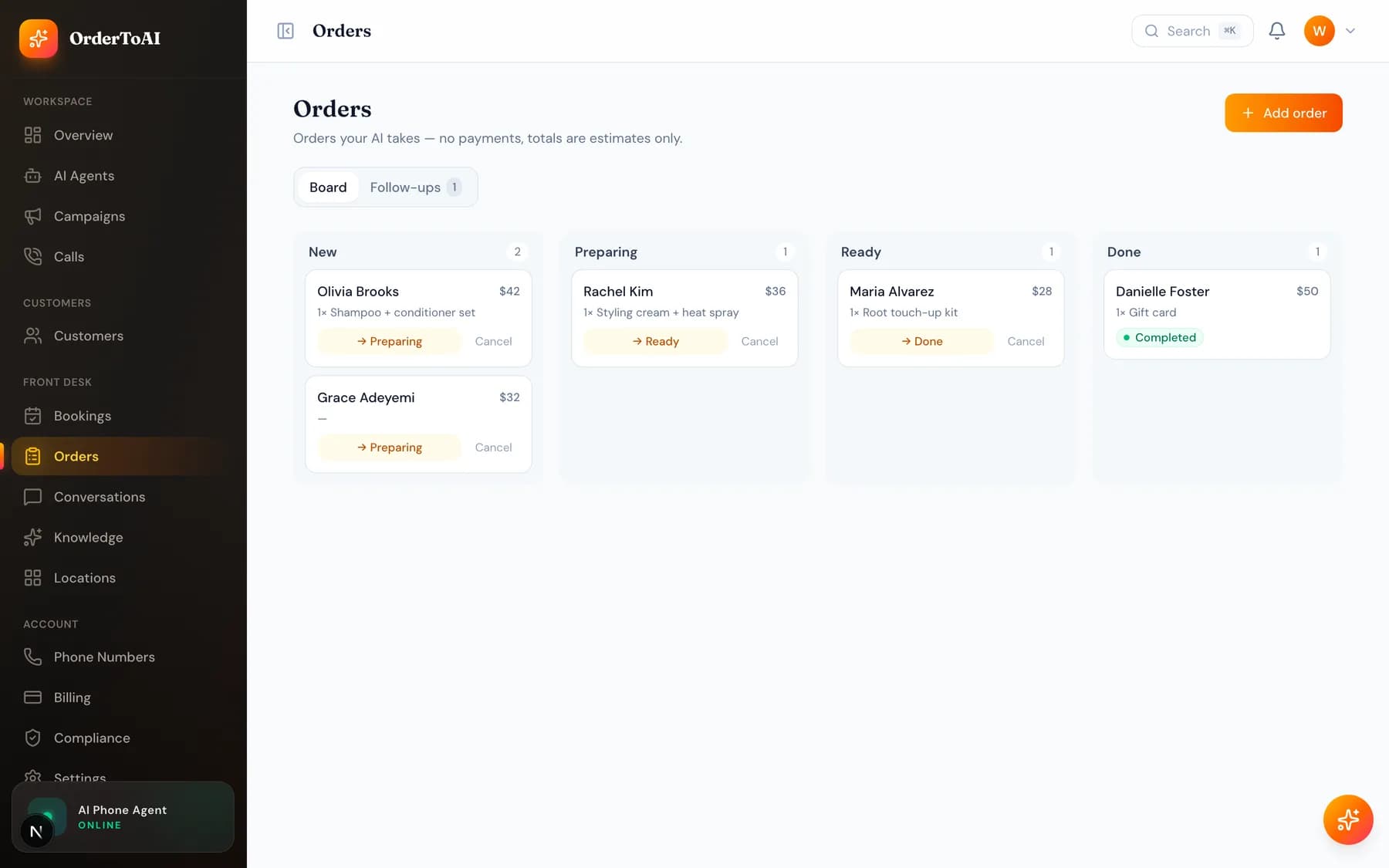
Front DeskOrders is the board for businesses that take orders but are not restaurants, which get the Kitchen board instead. Every order the AI takes on a call or a text arrives here as a card, and you move it through New, Preparing, Ready, and Done as the work happens. The board refreshes itself, so a phone propped on the counter stays current without anyone touching it. Two things are worth knowing up front. Totals on a card are estimates rather than an invoice, because the AI never takes card details anywhere in the product: when something needs paying it texts a secure link instead. And a second tab collects abandoned orders, the people who started ordering and drifted off, so you can send one polite nudge and often recover the sale.
What is on the page
| Area | What it does |
|---|---|
| Board | Every live order as a card across four columns, newest first, refreshing on its own. On a phone the columns swipe one at a time. |
| Add order | Log an order that did not come through the AI, such as a walk-in or one a staff member took by hand, so everything sits on one board. |
| Follow-ups | Customers who started an order and never finished it, grouped by how recently, each with a one-tap text to try to win it back. |
Worth knowing
- Card totals are non-binding estimates, not invoices. No card details are taken anywhere on a call or in a text.
- An order you add by hand has no price field, so it shows no total on this board.
- Cancelling an order happens immediately with no confirmation step, and a cancelled order disappears from the board rather than moving to a cancelled column.
- Restaurants do not see this page. Their equivalent is the Kitchen board, which is built around a service rather than a job list.
Questions
- Why are no orders appearing on my board?
- The usual reason is that order taking is switched off for your inbound agent. Open AI Agents, open the Front Desk agent, and enable "Take orders & pickup" on the Skills tab. Until that is on, the AI will happily answer calls and even discuss your products but will never record an order.
- Does the AI take payment for an order?
- No, and it never asks for card details on a call or in a text. If payment is needed it sends a secure link to your own payment page, which keeps card data out of your call transcripts and out of your compliance scope entirely.
- What is an abandoned order?
- Someone who started ordering with the AI and did not finish, usually because they hung up or stopped replying mid conversation. They appear on the Follow-ups tab with a one-tap text so you can nudge them once, which is often enough to recover an order that would otherwise be lost.
- Can I get a cancelled order back?
- Not from this board. Cancelling removes the order from the board immediately and there is no cancelled column to restore it from, so treat cancel as final and re-add the order by hand if it was a mistake.
Next steps
AI Agents
The full reference for the AI Agents page and the agent editor: identity, voice, behavior, brain, skills, conversation timing, knowledge, upselling, and advanced.
Kitchen
The live board for orders the AI takes by phone, how order status moves, and how kitchen staff can be given access to only this screen.
Conversations
The shared text inbox where your AI replies to customers, how it books over SMS, when it hands over to you, and why messaging needs carrier registration.
Hear it on your own business
Reading about it only goes so far. The demo calls you and answers as your business, using your real Google profile, before you create an account.
Start free trial